

Palo Alto Networks XDR-Engineer Daily Practice Exam New 2026 Updated 83 Questions
Use Valid XDR-Engineer Exam - Actual Exam Question & Answer
NEW QUESTION # 39
Using the Cortex XDR console, how can additional network access be allowed from a set of IP addresses to an isolated endpoint?
- A. Add entries in the Allowed Domains section of Security Settings for the tenant
- B. Add entries in Exceptions Configuration section of Isolation Exceptions
- C. Add entries in Configuration section of Security Settings
- D. Add entries in Response Actions section of Agent Settings profile
Answer: B
Explanation:
When an endpoint is isolated in Cortex XDR, all network traffic to and from the device is blocked by default, except for traffic explicitly required to communicate with the Cortex XDR management console.
To allow specific, additional administrative or troubleshooting traffic (such as allowing a specific set of IT admin IP addresses to RDP or SSH into the isolated machine), you must configure Isolation Exceptions:
Where to find it: In the Cortex XDR console, you navigate to Settings -> Configurations -> Endpoint Tuning -> Isolation Exceptions.
How it works: Within this section, you define the network rules (IP addresses, ports, and protocols) that the agent should respect even when a "Hard Isolation" or standard isolation command is active on the endpoint.
NEW QUESTION # 40
An organization experiences recurring malware alerts from the same endpoint despite repeated remediation efforts. What should investigators examine first?
- A. Persistence Mechanisms
- B. Agent Version History
- C. Network Throughput Statistics
- D. Endpoint Screen Resolution
Answer: A
Explanation:
Repeated infections often indicate unresolved persistence methods such as scheduled tasks, services, startup folders, registry run keys, or malicious scripts. Eliminating persistence is essential to preventing reinfection.
NEW QUESTION # 41
Based on the Malware profile image below, what happens when a new custom-developed application attempts to execute on an endpoint?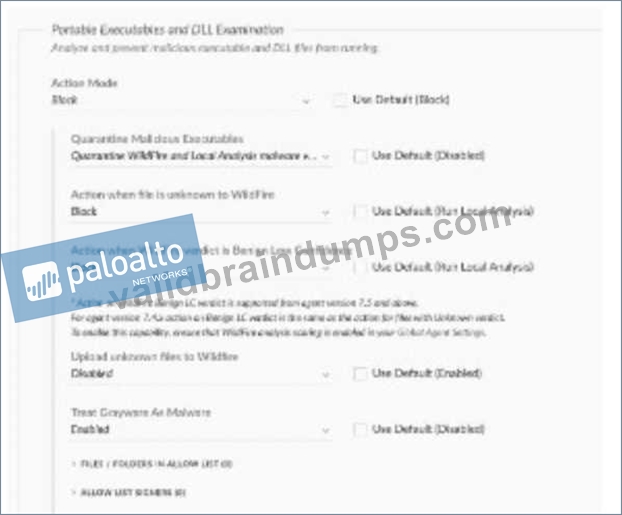
- A. It will immediately execute
- B. It will execute after one hour
- C. It will execute after the second attempt
- D. It will not execute
Answer: D
Explanation:
Based on the profile settings shown:
Action Mode: Block
Action when file is unknown to WildFire: Block
A new custom-developed application would be unknown to WildFire (no prior verdict exists for it).
With the "Action when file is unknown to WildFire" explicitly set to Block, the file will be prevented from executing.
Additionally, Upload unknown files to WildFire is Disabled, meaning the file won't even be submitted for analysis - it simply gets blocked with no detonation path.
NEW QUESTION # 42
Which step is required to configure a proxy for an XDR Collector?
- A. Restart the XDR Collector after configuring the proxy settings
- B. Configure the proxy settings on the Cortex XDR tenant
- C. Connect the XDR Collector to the Pathfinder
- D. Edit the YAML configuration file with the new proxy information
Answer: D
Explanation:
TheXDR Collectorin Cortex XDR is a lightweight tool for collecting logs and events from servers and endpoints. When a proxy is required for the XDR Collector to communicate with the Cortex XDR cloud, the proxy settings must be configured in the collector's configuration file. Specifically, theYAML configuration file(e.g., config.yaml) must be edited to include the proxy details, such as the proxy server's address, port, and authentication credentials (if required).
* Correct Answer Analysis (A):To configure a proxy for the XDR Collector, the engineer mustedit the YAML configuration filewith the new proxy information. This involves adding or updating the proxy settings in the file, which the collector uses to route its traffic through the specified proxy server.
* Why not the other options?
* B. Restart the XDR Collector after configuring the proxy settings: While restarting the collector may be necessary to apply changes, it is not the primary step required to configure the proxy. The YAML file must be edited first.
* C. Connect the XDR Collector to the Pathfinder: The Pathfinder is a Cortex XDR feature for discovering endpoints, not for configuring proxy settings for the XDR Collector.
* D. Configure the proxy settings on the Cortex XDR tenant: Proxy settings for the XDR Collector are configured locally on the collector, not in the Cortex XDR tenant's web interface.
Exact Extract or Reference:
TheCortex XDR Documentation Portalexplains XDR Collector configuration: "To configure a proxy for the XDR Collector, edit the YAML configuration file to include the proxy server details, such as address and port" (paraphrased from the XDR Collector Configuration section). TheEDU-260: Cortex XDR Prevention and Deploymentcourse covers XDR Collector setup, stating that"proxy settings are configured by editing the collector's YAML file" (paraphrased from course materials). ThePalo Alto Networks Certified XDR Engineer datasheetincludes "data ingestion and integration" as a key exam topic, encompassing XDR Collector configuration.
References:
Palo Alto Networks Cortex XDR Documentation Portal:https://docs-cortex.paloaltonetworks.com/ EDU-260: Cortex XDR Prevention and Deployment Course Objectives Palo Alto Networks Certified XDR Engineer Datasheet:https://www.paloaltonetworks.com/services/education
/certification#xdr-engineer
NEW QUESTION # 43
During the deployment of a Broker VM in a high availability (HA) environment, after configuring the Broker VM FQDN, an XDR engineer must ensure agent installer availability and efficient content caching to maintain performance consistency across failovers. Which additionalconfiguration steps should the engineer take?
- A. Use shared SSL certificates and keys for all Broker VMs and configure a single IP address for failover
- B. Upload the-signed SSL server certificate and key and deploy a load balancer
- C. Enable synchronized session persistence across Broker VMs and use a self-signed certificate and key
- D. Deploy a load balancer and configure SSL termination at the load balancer
Answer: B
Explanation:
In a high availability (HA) environment, theBroker VMin Cortex XDR acts as a local proxy to facilitate agent communications, content caching, and installer distribution, reducing dependency on direct cloud connections. To ensureagent installer availabilityandefficient content cachingacross failovers, the Broker VM must be configured to handle agent requests consistently, even if one VM fails. This requires proper SSL certificate management and load balancing to distribute traffic across multiple Broker VMs.
* Correct Answer Analysis (B):The engineer shouldupload the signed SSL server certificate and key to each Broker VM to secure communications and ensure trust between agents and the Broker VMs.
Additionally, deploying aload balancerin front of the Broker VMs allows traffic to be distributed across multiple VMs, ensuring availability and performance consistency during failovers. The load balancer uses the configured Broker VM FQDN to route agent requests, and the signed SSL certificate ensures secure, uninterrupted communication. This setup supports content caching and installer distribution by maintaining a stable connection point for agents.
* Why not the other options?
* A. Use shared SSL certificates and keys for all Broker VMs and configure a single IP address for failover: While shared SSL certificates can be used, configuring a single IP address for failover (e.g., via VRRP or a floating IP) is less flexible than a load balancer and may not efficiently handle content caching or installer distribution across multiple VMs. Load balancers are preferred for HA setups in Cortex XDR.
* C. Deploy a load balancer and configure SSL termination at the load balancer: SSL termination at the load balancer means the load balancer decrypts traffic before forwarding it to the Broker VMs, requiring unencrypted communication between the load balancer and VMs. This is not recommended for Cortex XDR, as Broker VMs require end-to-end SSL encryption for security, and SSL termination complicates certificate management.
* D. Enable synchronized session persistence across Broker VMs and use a self-signed certificate and key: Self-signed certificates are not recommended for production HA environments, as they can cause trust issues with agents and require manual configuration.
Synchronized session persistence is not a standard feature for Broker VMs and is unnecessary for content caching or installer availability.
Exact Extract or Reference:
TheCortex XDR Documentation Portaldescribes Broker VM HA configuration: "For high availability, deploy multiple Broker VMs behind a load balancer and upload a signed SSL server certificate and key to each VM to secure agent communications" (paraphrased from the Broker VM Deployment section). TheEDU-
260: Cortex XDR Prevention and Deploymentcourse covers Broker VM setup, stating that "a load balancer with signed SSL certificates ensures agent installer availability and content caching in HA environments" (paraphrased from course materials). ThePalo Alto Networks Certified XDR Engineer datasheetincludes
"planning and installation" as a key exam topic, encompassing Broker VM deployment for HA.
References:
Palo Alto Networks Cortex XDR Documentation Portal:https://docs-cortex.paloaltonetworks.com/ EDU-260: Cortex XDR Prevention and Deployment Course Objectives Palo Alto Networks Certified XDR Engineer Datasheet:https://www.paloaltonetworks.com/services/education
/certification#xdr-engineer
NEW QUESTION # 44
An engineer is building a dashboard to visualize the number of alerts from various sources. One of the widgets from the dashboard is shown in the image below: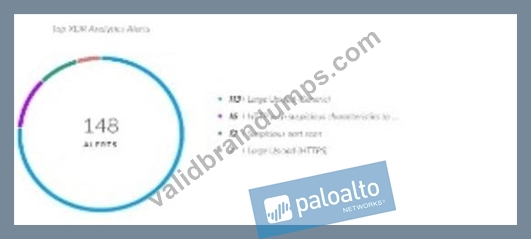
The engineer wants to configure a drilldown on this widget to allow dashboard users to select any of the alert names and view those alerts with additional relevant details. The engineer has configured the following XQL query to meet the requirement:
dataset = alerts
| fields alert_name, description, alert_source, severity,
original_tags, alert_id, incident_id
| filter alert_name =
| sort desc _time
How will the engineer complete the third line of the query (filter alert_name =) to allow dynamic filtering on a selected alert name?
- A. $x_axis.value
- B. $y_axis.name
- C. $x_axis.name
- D. $y_axis.value
Answer: A
Explanation:
For a chart drilldown, the clicked chart category is passed as the x-axis value, and Cortex XDR's drilldown variables documentation says $x_axis.value captures the clicked x-axis value for filtering.
In this case, the alert names are the chart categories being selected, so the query should use the clicked x-axis value to dynamically filter alert_name.
NEW QUESTION # 45
An administrator wants to employ reusable rules within custom parsing rules to apply consistent log field extraction across multiple data sources. Which section of the parsing rule should the administrator use to define those reusable rules in Cortex XDR?
- A. FILTER
- B. RULE
- C. INGEST
- D. CONST
Answer: B
Explanation:
The custom syntax used to write Palo Alto Networks Cortex XDR/XSIAM Parsing Rules (known as XQL for Parsing, or XQLp) breaks a rule file down into distinct, specialized structural blocks:
The RULE Section: This optional section is explicitly designed to define isolated, standalone processing components or logic sequences (such as a specific log field extraction pattern).
Because these blocks are tagged with a custom name, they can be repeatedly invoked inside multiple INGEST statements using the call stage syntax (alter field = call ruleName;). This allows you to apply the exact same log parsing logic across completely different log types or data sources without rewriting the code.
NEW QUESTION # 46
Which method will drop undesired logs and reduce the amount of data being ingested?
- A. [INGEST:vendor="vendor", product="product",
target_dataset="vendor_product_raw",no_hit=drop] * filter _raw_log not contains "undesired logs"; - B. [COLLECT:vendor="vendor", product="product", target_dataset="", no_hit=drop] * drop _raw_log contains "undesired logs";
- C. [COLLECT:vendor="vendor", product="product", target_brokers="", no_hit=drop] * drop _raw_log contains "undesired logs";
- D. [INGEST:vendor="vendor", product="product", target_brokers="vendor_product_raw", no_hit=keep] * filter _raw_log not contains "undesired logs";
Answer: A
Explanation:
In Palo Alto Networks Cortex XDR/XSIAM, parsing rules use a specialized variant of XQL to process, normalize, and selectively filter incoming raw logs before they consume storage licenses in the cloud data lake.
The Core Block Structure: Custom parsing rules must utilize the INGEST declaration block to route log traffic into an active repository (specified via target_dataset). The COLLECT block (seen in options A and C) is structurally incorrect for this parsing workflow.
The Filtering Mechanism: The statement filter _raw_log not contains "undesired logs"; evaluates incoming logs and keeps only the lines that do not match your noisy or unnecessary signatures.
Handling Dropped Traffic via no_hit: The parameter no_hit=drop is the critical setting here. It specifies that any log lines that are completely filtered out or fail to match the parsing logic conditions should be permanently dropped at the ingestion stage, successfully preventing them from being written to the database and reducing your ingestion volume metrics.
NEW QUESTION # 47
An insider compromise investigation has been requested to provide evidence of an unauthorized removable drive being mounted on a company laptop. Cortex XDR agent is installed with default prevention agent settings profile and default extension "Device Configuration" profile. Where can an engineer find the evidence?
- A. preset = device_control
- B. Check Host Inventory -> Mounts
- C. The requested data requires additional configuration to be captured
- D. dataset = xdr_data | filter event_type = ENUM.MOUNT and event_sub_type = ENUM.MOUNT_DRIVE_MOUNT
Answer: C
Explanation:
With the default prevention agent settings profile and default Device Configuration profile, Cortex XDR does not automatically capture detailed removable media mount activity needed as forensic evidence for unauthorized removable drive mounting.
To capture this type of evidence, additional configuration is typically required, such as enabling enhanced device control monitoring/logging policies.
NEW QUESTION # 48
In addition to using valid authentication credentials, what is required to enable the setup of the Database Collector applet on the Broker VM to ingest database activity?
- A. Access to the database transaction log
- B. Valid SQL query targeting the desired data
- C. Access to the database audit log
- D. Database schema exported in the correct format
Answer: C
Explanation:
The Database Collector applet on the Broker VM is designed to ingest database activity monitoring data into Cortex XSIAM/XDR. Beyond providing valid authentication credentials to connect to the database, the collector specifically requires access to the database audit log - because that is the source from which database activity events (logins, queries, schema changes, privilege use, etc.) are read and forwarded.
The audit log is the structured record of database activity that the collector parses and ingests.
Without access to it, the applet has no activity data to collect, regardless of whether authentication succeeds.
NEW QUESTION # 49
Which step is required to configure a proxy for an XDR Collector?
- A. Restart the XDR Collector after configuring the proxy settings
- B. Configure the proxy settings on the Cortex XDR tenant
- C. Edit the YAML configuration file with the new proxy information
- D. Connect the XDR Collector to the Pathfinder
Answer: A
Explanation:
The Cortex XDR documentation shows that proxy settings are applied from the XDR Collectors Administration page, and the collector service must then be restarted for the proxy configuration to take effect.
The proxy is not configured in the tenant-wide settings, and it is not done by connecting the collector to Pathfinder.
NEW QUESTION # 50
When isolating Cortex XDR agent components to troubleshoot for compatibility, which command is used to turn off a component on a Windows machine?
- A. C:\Program Files\Palo Alto Networks\Traps\cytool.exe runtime stop <component>
- B. C:\Program Files\Palo Alto Networks\Traps\xdr.exe runtime stop <component>
- C. C:\Program Files\Palo Alto Networks\Traps\xdr.exe stop <component>
- D. C:\Program Files\Palo Alto Networks\Traps\cytool.exe stop <component>
Answer: A
Explanation:
When troubleshooting performance or third-party software compatibility issues on an endpoint, administrators use the specialized cytool CLI utility to manage internal agent processes.
The Command Mechanism: Running cytool runtime stop instructs the Cortex XDR agent to temporarily disable or shut down its active real-time protection engines and background services (such as the main supervisor and driver modules).
Security Note: Because the agent is protected against tampering, executing this command from an administrative command prompt typically requires you to first provide the unique uninstallation/protection password generated by the Cortex XDR management console.
NEW QUESTION # 51
What happens when the XDR Collector is uninstalled from an endpoint by using the Cortex XDR console?
- A. The associated configuration data is removed from the Action Center immediately after uninstallation
- B. The machine status remains active until manually removed, and the configuration data is retained for up to seven days
- C. It is uninstalled during the next heartbeat communication, machine status changes to Uninstalled, and the configuration data is retained for 90 days
- D. The files are removed immediately, and the machine is deleted from the system without any retention period
Answer: C
Explanation:
When you initiate an uninstallation of an agent or collector from the Cortex XDR management console, the action follows an asynchronous lifecycle:
Next Heartbeat Execution: The cloud management console cannot instantly force changes down to an endpoint. Instead, it creates a pending action. The next time the endpoint checks in with the cloud (its heartbeat communication), it receives the uninstallation command and executes it locally.
Console Status Change: Once the uninstallation is successfully completed and reported back, the endpoint's status in the console updates to Uninstalled.
Data Retention Window: To prevent permanent accidental data loss and to allow administrators time to audit or re-enroll the asset, Cortex XDR retains the machine's configuration data and historic telemetry metadata in the database for a standard buffer period of 90 days before completely purging it.
NEW QUESTION # 52
A cloud administrator reports high network bandwidth costs attributed to Cortex XDR operations and asks for bandwidth usage to be optimized without compromising agent functionality. Which two techniques should the engineer implement? (Choose two.)
- A. Enable minor content version updates
- B. Configure P2P download sources for agent upgrades and content updates
- C. Enable agent content management bandwidth control
- D. Deploy a Broker VM and activate the local agent settings applet
Answer: B,C
Explanation:
Cortex XDR agents communicate with the cloud for tasks like receiving content updates, agent upgrades, and sending telemetry data, which can consume significant network bandwidth. To optimize bandwidth usage without compromising agent functionality, the engineer should implement techniques that reduce network traffic while maintaining full detection, prevention, and response capabilities.
* Correct Answer Analysis (A, C):
* A. Configure P2P download sources for agent upgrades and content updates: Peer-to-Peer (P2P) download sources allow Cortex XDR agents to share content updates and agent upgrades with other agents on the same network, reducing the need for each agent to download data directly from the cloud. This significantly lowers bandwidth usage, especially in environments with many endpoints.
* C. Enable agent content management bandwidth control: Cortex XDR provides bandwidth control settings in theContent Managementconfiguration, allowing administrators to limit the bandwidth used for content updates and agent communications. This feature throttles data transfers to minimize network impact while ensuring updates are still delivered.
* Why not the other options?
* B. Enable minor content version updates: Enabling minor content version updates ensures agents receive incremental updates, but this alone does not significantly optimize bandwidth, as it does not address the volume or frequency of data transfers. It is a standard practice but not a primary bandwidth optimization technique.
* D. Deploy a Broker VM and activate the local agent settings applet: A Broker VM can act as a local proxy for agent communications, potentially reducing cloud traffic, but thelocal agent settings appletis used for configuring agent settings locally, not for bandwidth optimization.
Additionally, deploying a Broker VM requires significant setup and may not directly address bandwidth for content updates or upgrades compared to P2P or bandwidth control.
Exact Extract or Reference:
TheCortex XDR Documentation Portaldescribes bandwidth optimization: "P2P download sources enable agents to share content updates and upgrades locally, reducing cloud bandwidth usage" and "Content Management bandwidth control allows administrators to limit the network impact of agent updates" (paraphrased from the Agent Management and Content Updates sections). TheEDU-260: Cortex XDR Prevention and Deploymentcourse covers post-deployment optimization, stating that "P2P downloads and bandwidth control settings are key techniques for minimizing network usage" (paraphrased from course materials). ThePalo Alto Networks Certified XDR Engineer datasheetincludes "post-deployment management and configuration" as a key exam topic, encompassing bandwidth optimization.
References:
Palo Alto Networks Cortex XDR Documentation Portal:https://docs-cortex.paloaltonetworks.com/ EDU-260: Cortex XDR Prevention and Deployment Course Objectives Palo Alto Networks Certified XDR Engineer Datasheet:https://www.paloaltonetworks.com/services/education
/certification#xdr-engineer
NEW QUESTION # 53
A security analyst is using Cortex XDR to analyze web server logs from an Apache server and wants to build a parsing rule to structure the incoming JSON-formatted logs, with the intent to extract specific fields.
Based on the log image below, which JSON function should be used to extract remote_ip, scanned_ip, and source_log fields?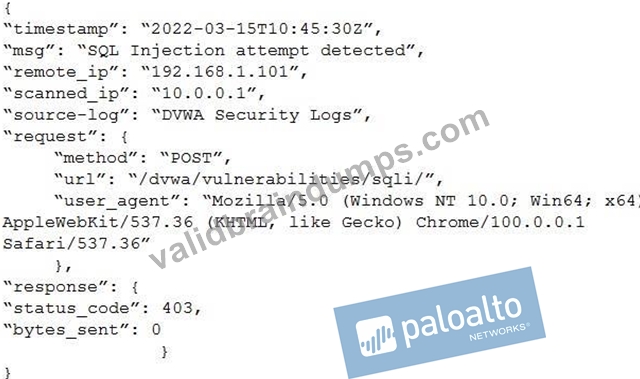
- A. json_extract_string
- B. json_extract_scalar
- C. json_extract_array
- D. to_json_string
Answer: B
Explanation:
json_extract_scalar is used to extract scalar values such as strings, numbers, or booleans from JSON-formatted log fields. The remote IP, scanned IP, and source log values are scalar fields, so this function is appropriate for parsing them into structured fields.
NEW QUESTION # 54
How long is data kept in the temporary hot storage cache after being queried from cold storage?
- A. 1 hour, re-queried to a maximum of 12 hours
- B. 24 hours, re-queried to a maximum of 7 days
- C. 1 hour, re-queried to a maximum of 24 hours
- D. 24 hours, re-queried to a maximum of 14 days
Answer: B
Explanation:
In Cortex XDR, data is stored in different tiers:hot storage(for recent, frequently accessed data),cold storage (for older, less frequently accessed data), and atemporary hot storage cachefor data retrieved from cold storage during queries. When data is queried from cold storage, it is moved to the temporary hot storage cache to enable faster access for subsequent queries. The question asks how long this data remains in the cache and the maximum duration for re-queries.
* Correct Answer Analysis (B):Data retrieved from cold storage is kept in the temporary hot storage cache for24 hours. If the data is re-queried within this period, it remains accessible in the cache. The maximum duration for re-queries is7 days, after which the data may need to be retrieved from cold storage again, incurring additional processing time.
* Why not the other options?
* A. 1 hour, re-queried to a maximum of 12 hours: These durations are too short and do not align with Cortex XDR's data retention policies for the hot storage cache.
* C. 24 hours, re-queried to a maximum of 14 days: While the initial 24-hour cache duration is correct, the 14-day maximum for re-queries is too long and not supported by Cortex XDR's documentation.
* D. 1 hour, re-queried to a maximum of 24 hours: The 1-hour initial cache duration is incorrect, as Cortex XDR retains queried data for 24 hours.
Exact Extract or Reference:
TheCortex XDR Documentation Portalexplains data storage: "Data queried from cold storage is cached in hot storage for 24 hours, with a maximum re-query period of 7 days" (paraphrased from the Data Management section). TheEDU-262: Cortex XDR Investigation and Responsecourse covers data retention, stating that "queried cold storage data remains in the hot cache for 24 hours, accessible for up to 7 days with re-queries" (paraphrased from course materials). ThePalo Alto Networks Certified XDR Engineer datasheetincludes "maintenance and troubleshooting" as a key exam topic, encompassing data storage management.
References:
Palo Alto Networks Cortex XDR Documentation Portal:https://docs-cortex.paloaltonetworks.com/ EDU-262: Cortex XDR Investigation and Response Course Objectives Palo Alto Networks Certified XDR Engineer Datasheet:https://www.paloaltonetworks.com/services/education
/certification#xdr-engineer
NEW QUESTION # 55
A new parsing rule is created, and during testing and verification, all the logs for which field data is to be parsed out are missing. All the other logs from this data source appear as expected. What may be the cause of this behavior?
- A. The filter stage is dropping the logs
- B. The Broker VM is offline
- C. The parsing rule corrupted the database
- D. The XDR Collector is dropping the logs
Answer: A
Explanation:
In Cortex XDR,parsing rulesare used to extract and normalize fields from raw log data during ingestion, ensuring that the data is structured for analysis and correlation. The parsing process includes stages such as filtering, parsing, and mapping. If logs for which field data is to be parsed out are missing, while other logs from the same data source are ingested as expected, the issue likely lies within the parsing rule itself, specifically in the filtering stage that determines which logs are processed.
* Correct Answer Analysis (C):The filter stage is dropping the logsis the most likely cause. Parsing rules often include afilter stagethat determines which logs are processed based on specific conditions (e.
g., log content, source, or type). If the filter stage of the new parsing rule is misconfigured (e.g., using an incorrect condition like log_type != expected_type or a regex that doesn't match the logs), it may drop the logs intended for parsing, causing them to be excluded from the ingestion pipeline. Since other logs from the same data source are ingested correctly, the issue is specific to the parsing rule's filter, not a broader ingestion problem.
* Why not the other options?
* A. The Broker VM is offline: If the Broker VM were offline, it would affect all log ingestion from the data source, not just the specific logs targeted by the parsing rule. The question states that other logs from the same data source are ingested as expected, so the Broker VM is likely operational.
* B. The parsing rule corrupted the database: Parsing rules operate on incoming logs during ingestion and do not directly interact with or corrupt the Cortex XDR database. This is an unlikely cause, and database corruption would likely cause broader issues, not just missing specific logs.
* D. The XDR Collector is dropping the logs: The XDR Collector forwards logs to Cortex XDR, and if it were dropping logs, it would likely affect all logs from the data source, not just those targeted by the parsing rule. Since other logs are ingested correctly, the issue is downstream in the parsing rule, not at the collector level.
Exact Extract or Reference:
TheCortex XDR Documentation Portalexplains parsing rule behavior: "The filter stage in a parsing rule determines which logs are processed; misconfigured filters can drop logs, causing them to be excluded from ingestion" (paraphrased from the Data Ingestion section). TheEDU-260: Cortex XDR Prevention and Deploymentcourse covers parsing rule troubleshooting, stating that "if specific logs are missing during parsing, check the filter stage for conditions that may be dropping the logs" (paraphrased from course materials). ThePalo Alto Networks Certified XDR Engineer datasheetincludes "data ingestion and integration" as a key exam topic, encompassing parsing rule configuration and troubleshooting.
References:
Palo Alto Networks Cortex XDR Documentation Portal:https://docs-cortex.paloaltonetworks.com/ EDU-260: Cortex XDR Prevention and Deployment Course Objectives Palo Alto Networks Certified XDR Engineer Datasheet:https://www.paloaltonetworks.com/services/education
/certification#xdr-engineer
NEW QUESTION # 56
How are dynamic endpoint groups created and managed in Cortex XDR?
- A. Each endpoint can belong to multiple groups simultaneously, allowing different security policies to be applied to the same device at the same time
- B. Endpoint groups require intervention to update the group with new endpoints when a new device is added to the network
- C. Endpoint groups are defined based on fields such as OS type, OS version, and network segment
- D. After an endpoint group is created, its assigned security policy cannot be changed without deleting and recreating the group
Answer: C
Explanation:
In Cortex XDR,dynamic endpoint groupsare used to organize endpoints for applying security policies, managing configurations, and streamlining operations. These groups are defined based on dynamic criteria, such asOS type,OS version,network segment,hostname, or other endpoint attributes. When a new endpoint is added to the network, it is automatically assigned to the appropriate group(s) based on these criteria, without manual intervention. This dynamic assignment ensures that security policies are consistently applied to endpoints matching the group's conditions.
* Correct Answer Analysis (D):The optionDaccurately describes how dynamic endpoint groups are created and managed. Administrators define groups using filters based on endpoint attributes like operating system (e.g., Windows, macOS, Linux), OS version (e.g., Windows 10 21H2), or network segment (e.g., subnet or domain). These filters are evaluated dynamically, so endpoints are automatically added or removed from groups as their attributes change or new devices are onboarded.
* Why not the other options?
* A. Endpoint groups require intervention to update the group with new endpoints when a new device is added to the network: This is incorrect because dynamic endpoint groups are designed to automatically include new endpoints that match the group's criteria, without manual intervention.
* B. Each endpoint can belong to multiple groups simultaneously, allowing different security policies to be applied to the same device at the same time: This is incorrect because, in Cortex XDR, an endpoint is assigned to a single endpoint group for policy application to avoid conflicts.
While endpoints can match multiple group criteria, the system uses a priority or hierarchy to assign the endpoint to onegroup for policy enforcement.
* C. After an endpoint group is created, its assigned security policy cannot be changed without deleting and recreating the group: This is incorrect because Cortex XDR allows administrators to modify the security policy assigned to an endpoint group without deleting and recreating the group.
Exact Extract or Reference:
TheCortex XDR Documentation Portalexplains endpoint group management: "Dynamic endpoint groups are created by defining filters based on endpoint attributes such as OS type, version, or network segment.
Endpoints are automatically assigned to groups based on these criteria" (paraphrased from the Endpoint Management section). TheEDU-260: Cortex XDR Prevention and Deploymentcourse covers endpoint group configuration, stating that "groups are dynamically updated as endpoints join or leave the network based on defined attributes" (paraphrased from course materials). ThePalo Alto Networks Certified XDR Engineer datasheetincludes "endpoint management and policy configuration" as a key exam topic, which encompasses dynamic endpoint groups.
References:
Palo Alto Networks Cortex XDR Documentation Portal:https://docs-cortex.paloaltonetworks.com/ EDU-260: Cortex XDR Prevention and Deployment Course Objectives Palo Alto Networks Certified XDR Engineer Datasheet:https://www.paloaltonetworks.com/services/education
/certification#xdr-engineer
NEW QUESTION # 57
A Cortex XDR agent needs to be uninstalled from two Windows machines that are no longer connected to the Cortex XDR tenant.
The uninstall password for the machines is not known.
Which set of actions should be taken to resolve this issue?
- A. Boot the machines in safe mode then uninstall the agent.
- B. Copy the original agent MSI installer to each machine then run Msiexec.exe with /x option.
- C. Stop the Cortex XDR services and delete the Cortex XDR folders and registry hives.
- D. Run the cytool.exe protect disable command on each machine then uninstall the agent.
Answer: B
Explanation:
For Windows endpoints that are no longer connected to the tenant and where the uninstall password is unavailable, the supported recovery approach is to use the original Cortex XDR agent MSI package locally and invoke Windows Installer with the uninstall option to remove the agent.
NEW QUESTION # 58
Which XQL query can be saved as a behavioral indicator of compromise (BIOC) rule, then converted to a custom prevention rule?
- A. dataset = xdr_data| filter event_type = ENUM.DEVICE and action_process_image_name =
"**"and action_process_image_command_line = "-e cmd*"and
action_process_image_command_line != "*cmd.exe -a /c*" - B. dataset = xdr_data| filter event_type = FILE and (event_sub_type = FILE_CREATE_NEW or event_sub_type = FILE_WRITE or event_sub_type = FILE_REMOVE or event_sub_type = FILE_RENAME) and agent_hostname = "hostname"| filter lowercase(action_file_path) in ("/etc/*",
"/usr/local/share/*", "/usr/share/*") and action_file_extension in ("conf", "txt")| fields action_file_name, action_file_path, action_file_type, agent_ip_addresses, agent_hostname, action_file_path - C. dataset = xdr_data| filter event_type = ENUM.PROCESS and action_process_image_name =
"**"and action_process_image_command_line = "-e cmd*"and
action_process_image_command_line != "*cmd.exe -a /c*" - D. dataset = xdr_data| filter event_type = ENUM.PROCESS and event_type = ENUM.DEVICE and action_process_image_name = "**"and action_process_image_command_line = "-e cmd*"and action_process_image_command_line != "*cmd.exe -a /c*"
Answer: C
Explanation:
A BIOC rule must be based on the xdr_data dataset and valid process behavior fields, and option D matches that pattern for a process-based BIOC that can later be converted into a custom prevention rule.
NEW QUESTION # 59
A new parsing rule is created, and during testing and verification, all the logs for which field data is to be parsed out are missing. All the other logs from this data source appear as expected. What may be the cause of this behavior?
- A. The filter stage is dropping the logs
- B. The Broker VM is offline
- C. The parsing rule corrupted the database
- D. The XDR Collector is dropping the logs
Answer: A
Explanation:
When configuring custom log ingestion and data modeling in Cortex XDR/XSIAM, Parsing Rules dictate how raw text logs are broken down into specific schema fields (such as IP addresses, timestamps, or usernames).
A parsing rule typically begins with a filter stage (such as a SQL-like filter or regex condition) to isolate and match only the specific log subtypes that need processing out of a broader data stream. If this filter condition is misconfigured, overly restrictive, or contains a typo, the parsing engine will fail to match any incoming records. Instead of parsing them incorrectly, it will drop or exclude those specific logs from the final dataset, while allowing all other unmapped logs from that same vendor source to stream in completely untouched.
NEW QUESTION # 60
When using Kerberos as the authentication method for Pathfinder, which two settings must be validated on the DNS server? (Choose two.)
- A. Reverse DNS records
- B. Reverse DNS zone
- C. DNS forwarders
- D. AD DS-integrated zones
Answer: A,B
Explanation:
Pathfinderin Cortex XDR is a tool for discovering unmanaged endpoints in a network, often using authentication methods likeKerberosto access systems securely. Kerberos authentication relies heavily on DNS for resolving hostnames and ensuring proper communication between clients, servers, and the Kerberos Key Distribution Center (KDC). Specific DNS settings must be validated to ensure Kerberos authentication works correctly for Pathfinder.
* Correct Answer Analysis (B, C):
* B. Reverse DNS zone: Areverse DNS zoneis required to map IP addresses to hostnames (PTR records), which Kerberos uses to verify the identity of servers and clients. Without a properly configured reverse DNS zone, Kerberos authentication may fail due to hostname resolution issues.
* C. Reverse DNS records:Reverse DNS records(PTR records) within the reverse DNS zone must be correctly configured for all relevant hosts. These records ensure that IP addresses resolve to the correct hostnames, which is critical for Kerberos to authenticate Pathfinder's access to endpoints.
* Why not the other options?
* A. DNS forwarders: DNS forwarders are used to route DNS queries to external servers when a local DNS server cannot resolve them. While useful for general DNS resolution, they are not specifically required for Kerberos authentication or Pathfinder.
* D. AD DS-integrated zones: Active Directory Domain Services (AD DS)-integrated zones enhance DNS management in AD environments, but they are not strictly required for Kerberos authentication. Kerberos relies on proper forward and reverse DNS resolution, not AD-specific DNS configurations.
Exact Extract or Reference:
TheCortex XDR Documentation Portalexplains Pathfinder configuration: "For Kerberos authentication, ensure that the DNS server has a properly configured reverse DNS zone and reverse DNS records to support hostname resolution" (paraphrased from the Pathfinder Configuration section). TheEDU-260: Cortex XDR Prevention and Deploymentcourse covers Pathfinder setup, stating that "Kerberos requires valid reverse DNS zones and PTR records for authentication" (paraphrased from course materials). ThePalo Alto Networks Certified XDR Engineer datasheetincludes "planning and installation" as a key exam topic, encompassing Pathfinder authentication settings.
References:
Palo Alto Networks Cortex XDR Documentation Portal:https://docs-cortex.paloaltonetworks.com/ EDU-260: Cortex XDR Prevention and Deployment Course Objectives Palo Alto Networks Certified XDR Engineer Datasheet:https://www.paloaltonetworks.com/services/education
/certification#xdr-engineer
NEW QUESTION # 61
An XDR engineer is configuring an automation playbook to respond to high-severity malware alerts by automatically isolating the affected endpoint and notifying the security team via email.
The playbook should only trigger for alerts generated by the Cortex XDR analytics engine, not custom BIOCs. Which two conditions should the engineer include in the playbook trigger to meet these requirements? (Choose two.)
- A. Alert source is Cortex XDR Analytics
- B. Alert category is Malware
- C. Alert severity is High
- D. Alert status is New
Answer: A,C
NEW QUESTION # 62
A static endpoint group is created by adding 321 endpoints using the Upload From File feature. However, after group creation, the members count field shows 244 endpoints. What are two possible reasons why endpoints were not added to the group? (Choose two.)
- A. Endpoints added to the group were in Disconnected or Connection Lost status when groupmembership was added
- B. Static groups have a limit of 250 endpoints when adding by file
- C. The IP address, hostname, or alias of the endpoints must match an existing agent that has registered with the tenant
- D. Endpoints added to the new group were previously added to an existing group
Answer: A,C
Explanation:
In Cortex XDR,static endpoint groupsare manually defined groups of endpoints, often created by uploading a file containing endpoint identifiers (e.g., IP addresses, hostnames, or aliases) using theUpload From File feature. If fewer endpoints are added to the group than expected (e.g., 244 instead of 321), there are several possible reasons related to endpoint status or registration.
* Correct Answer Analysis (C, D):
* **C. Endpoints added to the group were in Disconnected or Connection Lost status when group status when group membership was added: If endpoints are in aDisconnectedorConnection Loststatus (i.e., not actively communicating with the Cortex XDR tenant), they may not be successfully added to the group, as Cortex XDR requires active registration to validate and process group membership.
* D. The IP address, hostname, or alias of the endpoints must match an existing agent that has registered with the tenant: For endpoints to be added to a static group, their identifiers (IP address, hostname, or alias) in the uploaded file must correspond to agents that are registered with the Cortex XDR tenant. If the identifiers do not match registered agents, those endpoints will not be added to the group.
* Why not the other options?
* A. Static groups have a limit of 250 endpoints when adding by file: There is no documented limit of 250 endpoints for static groups in Cortex XDR when using the Upload From File feature.
The platform supports large numbers of endpoints in groups, and this is not a valid reason.
* B. Endpoints added to the new group were previously added to an existing group: In Cortex XDR, endpoints are assigned to a single group for policy application to avoid conflicts, but this does not prevent endpoints from being added to a new static group during creation. The issue lies in registration or connectivity, not prior group membership.
Exact Extract or Reference:
TheCortex XDR Documentation Portalexplains endpoint group management: "Endpoints must be registered and actively connected to the tenant to be added to static groups. Unregistered or disconnected endpoints may not be included in the group" (paraphrased from the Endpoint Management section). TheEDU-
260: Cortex XDR Prevention and Deploymentcourse covers group creation, stating that "static groups require valid, registered endpoint identifiers, and disconnected endpoints may not be added" (paraphrased from course materials). ThePalo Alto Networks Certified XDR Engineer datasheetincludes "Cortex XDR agent configuration" as a key exam topic, encompassing endpoint group management.
References:
Palo Alto Networks Cortex XDR Documentation Portal:https://docs-cortex.paloaltonetworks.com/ EDU-260: Cortex XDR Prevention and Deployment Course Objectives Palo Alto Networks Certified XDR Engineer Datasheet:https://www.paloaltonetworks.com/services/education
/certification#xdr-engineer
NEW QUESTION # 63
Multiple remote desktop users complain of in-house applications no longer working. The team uses macOS with Cortex XDR agents version 8.7.0, and the applications were previously allowed by disable prevention rules attached to the Exceptions Profile "Engineer-Mac." Based on the images below, what is a reason for this behavior?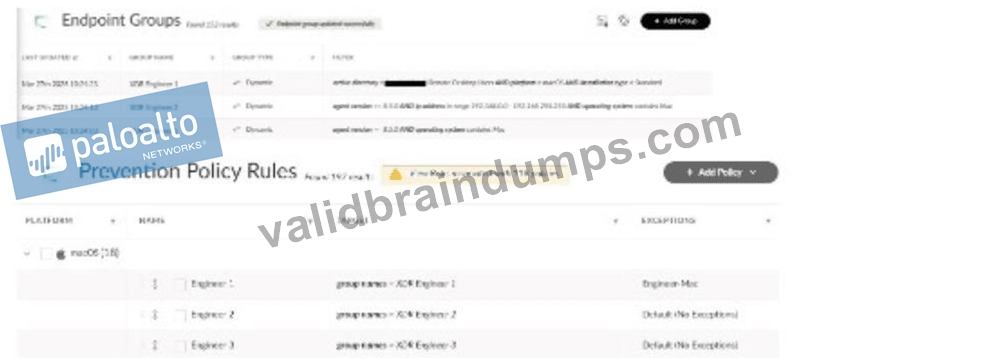
- A. XDR agent version was downgraded from 8.7.0 to 8.4.0
- B. Installation type changed from VDI to Kubernetes
- C. The Cloud Identity Engine is disconnected or removed
- D. Endpoint IP address changed from 192.168.0.0 range to 192.168.100.0 range
Answer: D
Explanation:
The scenario involves macOS users with Cortex XDR agents (version 8.7.0) who can no longer run in-house applications that were previously allowed via disable prevention rules in the"Engineer-Mac" Exceptions Profile. This profile is applied to an endpoint group (e.g., "Mac-Engineers"). Theissue likely stems from a change in the endpoint group's configuration or the endpoints' attributes, affecting policy application.
* Correct Answer Analysis (A):The reason for the behavior is that theendpoint IP address changed from 192.168.0.0 range to 192.168.100.0 range. In Cortex XDR, endpoint groups can be defined using dynamic criteria, such as IP address ranges, to apply specific policies like the "Engineer-Mac" Exceptions Profile. If the group "Mac-Engineers" was defined to include endpoints in the 192.168.0.0 range, and the remote desktop users' IP addresses changed to the 192.168.100.0 range (e.g., due to a network change or VPN reconfiguration), these endpoints would no longer belong to the "Mac- Engineers" group. As a result, the "Engineer-Mac" Exceptions Profile, which allowed the in-house applications, would no longer apply, causing the applications to be blocked by default prevention rules.
* Why not the other options?
* B. The Cloud Identity Engine is disconnected or removed: The Cloud Identity Engine provides user and group data for identity-based policies, but it is not directly related to Exceptions Profiles or application execution rules. Its disconnection would not affect the application of the "Engineer-Mac" profile.
* C. XDR agent version was downgraded from 8.7.0 to 8.4.0: The question states the users are using version 8.7.0, and there's no indication of a downgrade. Even if a downgrade occurred, it's unlikely to affect the application of an Exceptions Profile unless specific features were removed, which is not indicated.
* D. Installation type changed from VDI to Kubernetes: The installation type (e.g., VDI for virtual desktops or Kubernetes for containerized environments) is unrelated to macOS endpoints running remote desktop sessions. This change would not impact the application of the Exceptions Profile.
Exact Extract or Reference:
TheCortex XDR Documentation Portalexplains endpoint group policies: "Dynamic endpoint groups based on IP address ranges apply policies like Exceptions Profiles; if an endpoint's IP changes to a different range, it may no longer belong to the group, affecting policy enforcement" (paraphrased from the Endpoint Management section). TheEDU-260: Cortex XDR Prevention and Deploymentcourse covers policy application, stating that "changes in IP address ranges can cause endpoints to fall out of a group, leading to unexpected policy behavior like blocking previously allowed applications" (paraphrased from course materials). ThePalo Alto Networks Certified XDR Engineer datasheetincludes "Cortex XDR agent configuration" as a key exam topic, encompassing endpoint group and policy management.
References:
Palo Alto Networks Cortex XDR Documentation Portal:https://docs-cortex.paloaltonetworks.com/ EDU-260: Cortex XDR Prevention and Deployment Course Objectives Palo Alto Networks Certified XDR Engineer Datasheet:https://www.paloaltonetworks.com/services/education
/certification#xdr-engineer
NEW QUESTION # 64
......
Palo Alto Networks XDR-Engineer Exam Syllabus Topics:
| Topic | Details |
|---|---|
| Topic 1 |
|
| Topic 2 |
|
| Topic 3 |
|
| Topic 4 |
|
| Topic 5 |
|
Test Engine to Practice XDR-Engineer Test Questions: https://examsboost.validbraindumps.com/XDR-Engineer-exam-prep.html